8 Best Devin Alternatives for Engineering Teams in 2026
 Edvaldo Freitas

Devin put an important idea on the table: delegating development tasks to a more autonomous AI agent. From there, “Devin alternatives” became a broader search. Teams are not always looking for a Devin clone. Many times, they are trying to understand which type of AI tool makes the most sense for their own engineering workflow.
In practice, not every team wants to add a separate agent outside the current flow to handle changes end to end. In many cases, the problem is more specific: slow reviews, PRs that are too large, lack of context, repetitive tasks in the editor, or difficulty keeping standards consistent across repositories.
That is why the search for Devin alternatives usually falls into three groups.
Some teams want tools that fit into the workflow they already have. Something that works in VS Code, in the terminal, in GitHub, in GitLab, or directly in the pull request, without requiring a major process change.
Others want more control over what the AI does. They want to use AI to speed up parts of the work, but still review the steps, guide the changes, and decide what gets into the code.
And some teams are not looking for a generic agent. They are trying to solve a very specific bottleneck. For one team, that might be code review. For another, refactoring. For another, test generation or repetitive tasks in the editor. In those cases, a more focused tool usually works better than a broad solution trying to cover everything.
8 top Devin alternatives
This list covers different types of tools, from AI-native IDEs to terminal-focused agents and code review specialists. We ranked the options based on how they fit into different development workflows.
1. Kodus
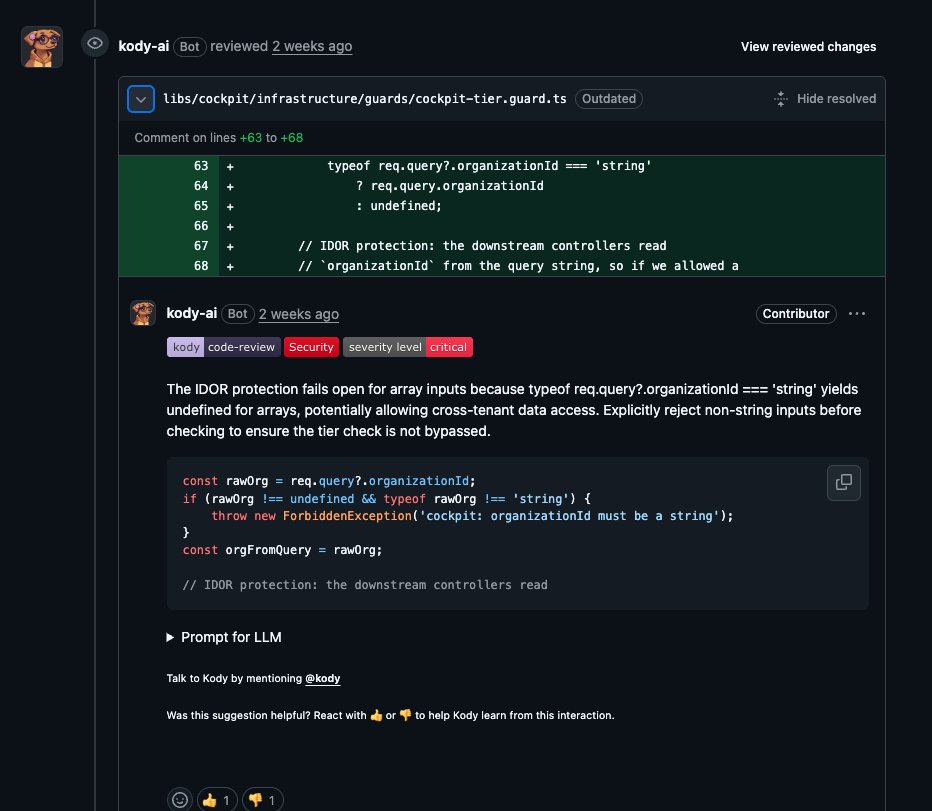
Kodus is an open source AI code review tool, not a code generation agent. It focuses on improving code quality and consistency before merge. It integrates directly into your Git workflow, reviews pull requests automatically, and delivers feedback based on general best practices and custom rules your team defines in natural language. It is the best alternative to Devin Review.
Pros:
- Specialized in code review. Kodus was built to review code, prioritize relevant issues, and reduce noise. It analyzes security risks, performance problems, error handling issues, maintainability concerns, and team-specific standards.
- More context than tools that only review the diff. The review still stays anchored in the PR, but Kodus also uses full repository context, code search, and, when enabled, cross-file analysis and pull request-level checks. This usually leads to more useful comments than tools that only look at the isolated patch.
- Customizable rules. Teams can create Kody Rules for their own engineering policies, version those rules inside the repository, and control behavior at the global, repository, and directory level. This is especially useful in monorepos or teams with different standards across services.
- Model-agnostic with real BYOK support. You can use your own keys from any LLM provider, giving you control over costs and model choice.
- Self-hosting. Teams with strict data privacy requirements can host Kodus in their own infrastructure.
Cons:
- Not for code generation. If you are looking for an agent to write features from scratch, Kodus is not the right tool. It is built to review and improve code, not create it.
Pricing:
The Community plan is free with BYOK.
The Teams plan costs $10 per active developer per month + tokens.
Best for: Teams that want to automate the code review process, apply consistent standards, and improve code quality without slowing down development.
Explore the open source repo: https://github.com/kodustech/kodus-ai
2. Cursor
Cursor is an AI IDE before anything else. It provides autocomplete, chat, multi-file editing, background agents, and Bugbot for review.
The comparison with Devin makes sense because both help produce code changes and automate part of the work. The workflow, however, is very different. Cursor starts in the editor. Devin starts from a more autonomous proposal. That is why Cursor tends to make more sense when the developer still wants to drive most of the process.
Pros:
- Very good workflow for developers who want to use agents and assisted editing directly in the IDE. Background Agents and Bugbot expand its use beyond autocomplete.
- Rules and project context can be versioned in the repository.
- Good option for teams that want to iterate quickly inside the editor.
Cons:
- Although it is a VS Code fork, it is its own editor. That can be a blocker for teams with strict policies around approved development environments.
- It is great for helping a developer who is actively coding, but it will not take a high-level prompt and finish an entire project by itself.
Pricing:
Pro at $20/month
Pro+ at $60/month
Ultra at $200/month
Teams at $40/user/month.
Best for: Teams that want IDE-centered AI, with agents and some automation, without completely changing how they write code.
3. Aider
Aider is an AI pair programming tool based in the terminal. It edits code directly in your local Git repository.
Its proposal is very different from Devin’s. Aider is closer to an AI pair programmer, controlled by the developer, than to an autonomous agent. It uses a repository map to better understand context, supports architecture and implementation modes, integrates well with Git, and works with many models, both cloud-based and local.
Pros
- Open source
- Works with many providers and local models
- Excellent Git integration, including auto-commits and undo
- Lightweight and easy to fit into the terminal
Cons
- Not designed for long-running autonomy in the background
- The workflow is more focused on one session per repo
- PR review is outside its main scope
Pricing: Free; model costs are separate.
Best for: Engineers who want terminal-based pair programming with a really good Git integration.
4. GitHub Copilot Coding Agent
GitHub Copilot Coding Agent is GitHub’s most direct answer to the issue-to-PR workflow. If your team already works inside GitHub, wants to automate tasks, and does not want to bring another platform into the process, it is a very natural alternative to Devin.
The main difference is scope. Copilot Coding Agent is more tied to the GitHub ecosystem. Devin tries to work as a broader and more autonomous layer.
Pros
- Works directly with issues and PRs in GitHub.
- Included in existing paid Copilot plans.
- Adoption tends to be simple for teams that already use GitHub as the base of their workflow.
- Benefits from the rest of the GitHub ecosystem.
Cons:
- Its functionality is almost entirely tied to GitHub. Teams using Bitbucket, GitLab, or other platforms are left out.
- Works better for incremental work than for teams that want a more independent agent.
Pricing: Included starting with Copilot Pro, at $10/month. Pro+ costs $39/month. Business and Enterprise are available for organizations.
Best for: Teams that mainly work in GitHub and want to automate tasks without leaving the platform.
5. Continue.dev
Continue.dev has become a broad open source platform for AI development. It covers IDE extensions, CLI workflows, PR checks, cloud agents, MCP integrations, and paths for self-hosted models.
That breadth is exactly what attracts some teams. You can treat Continue.dev as a customizable alternative to Devin when the goal is to build an AI workflow around your own checks, prompts, rules, and infrastructure, instead of adopting a more closed and opinionated agent.
Pros
- Open source and suitable for self-hosted setups or private models.
- Good customization with model roles, rules, prompts, and MCP servers.
- Makes sense for platform teams that want to build internal AI workflows instead of buying a closed product.
- Works both in the IDE and in the terminal.
Cons
- More configurable than ready to use.
- The product surface is broad, so new users need time to understand how the pieces connect.
- If you want a ready-made autonomous coding agent, with strong and opinionated defaults, other tools are simpler to start with.
Pricing: Starter costs $3 per million input and output tokens, on a pay-as-you-go model. Team costs $20 per seat/month and includes $10 in credits per seat. Company has custom pricing.
Best for: Teams that want open source flexibility, custom AI checks, self-hosting options, and more control over the stack than Devin usually offers.
6. Claude Code
Claude Code is Anthropic’s tool for working with code using Claude models. In practice, it stands out when you need to understand a real codebase, investigate bugs, refactor larger parts of the system, or discuss architecture decisions in the terminal.
Claude Code works more like a terminal-based work tool than a full IDE. It helps edit files, run commands, navigate the codebase, and use parts of the Claude ecosystem, such as skills, memory, and connectors, inside a workflow that is closer to day-to-day development.
Pros
- Terminal-native and easy to fit into the engineering workflow.
- Works with Anthropic, Bedrock, and Vertex.
- Project settings can be versioned in the repository.
- Good option for teams that want an agent with constant human supervision.
Cons
- The cost for teams depends more on token consumption than on a simple per-user price.
- It does not have the same backlog and collaboration layer that Devin tries to offer.
Pricing: Claude Pro costs $20 per month with monthly billing. Max starts at $100 per month. Standard Team seats cost $25 per seat per month with monthly billing, and Enterprise starts at $20 per seat plus usage.
Best for: Developers who want a high-quality coding agent for deep reasoning, code understanding, and good terminal workflows.
7. OpenAI Codex
OpenAI Codex is a coding agent that reads, edits, and runs code in cloud environments. It can also be used locally through the CLI and extensions.
The main difference compared with more editor-centered tools is delegation. You can assign multiple background tasks to Codex, let each one run in its own sandbox, trigger it through GitHub, and control internet access by environment. Among Devin alternatives, it is one of the closest when the focus is longer, parallel programming work running in the cloud.
Pros
- Good cloud task model, with sandboxed environments and parallel execution.
- Works on the web, in the IDE, CLI, GitHub, and also through mobile entry points.
- Very explicit security controls, including rules and internet access allowlists by environment.
- MCP, SDK, and GitHub integration create room for internal automations.
Cons
- The price currently depends on credit consumption based on tokens, so uncontrolled use can get expensive quickly.
- The best results still depend on well-configured environments, which adds operational work.
- It is not as natural in the GitHub review flow as Copilot, nor as specialized in review as Kodus.
Pricing: Codex is included in ChatGPT Plus, Pro, Business, Edu, and Enterprise plans. After that, usage is charged through credits. OpenAI updated Codex to token-based pricing and estimates average usage at around $100 to $200 per developer per month.
Best for: Teams that want to delegate tasks in the cloud, in a workflow similar to Devin, but with more control over the sandbox and more integration options with the OpenAI ecosystem.
8. Cline
Cline is an open source coding agent that runs in the editor and the terminal. It can read and edit files, execute commands, use the browser, and work with different providers.
The comparison with Devin makes sense for teams that want more autonomy in development, but still need transparency, BYOK, and explicit approval before certain actions. Cline makes the workflow more visible to the developer, which usually appeals to more technical teams.
Pros
- Open source.
- BYOK with several providers.
- Runs locally in your IDE, so it uses your exact development environment.
Cons
- Requires more setup decisions than a managed platform.
- Teams that want a ready-made cloud workflow may prefer Devin or Windsurf.
- More complete governance features are more tied to the enterprise offering.
Pricing: Free open source extension. Model costs or Cline credits are separate. Enterprise is available on request.
Best for: Teams that want an open coding agent and are willing to assemble more parts of their own stack.
Full comparison table
| Tool | Main category | Custom rules and policies | Starting price | Best fit |
|---|---|---|---|---|
| Kodus | AI code review | Yes. Kody Rules, global/repo/directory config, and versioned rules in the repository. | Community free; Teams at $10 per active developer/month + tokens | Teams that want repository-aware code review and stronger governance |
| Devin | Autonomous software agent | Yes. Session instructions and task context. | Free; Pro at $20/month; Teams from $80/month minimum | Teams that want to delegate implementation, debugging, and long-running tasks |
| Cursor | AI-first code editor | Yes. Rules, skills, hooks, and team context. | Hobby free; Pro at $20/month; Teams at $40/user/month | Developers who want AI embedded in the editor all day |
| Aider | Terminal pair programming | Partial. Configuration and git-based workflow. | Free; inference costs only | Developers who want local repo editing with a git-centric workflow |
| GitHub Copilot Coding Agent | GitHub-native agent and assistant | Yes. Repository instructions and GitHub policy controls. | Free; Pro at $10/month; Business at $19/user/month | Teams already centered on GitHub Issues, PRs, and Actions |
| Continue.dev | Open source agent and checks platform | Yes. Rules, tools, checks, and custom configuration. | Starter at $3 per million tokens; Team at $20/seat/month | Teams that want a more customizable and controlled AI development stack |
| Claude Code | Terminal-first coding agent | Partial. Projects, memory, skills, and context. | Claude Pro at $20/month; Max at $100/month | Developers who want strong reasoning for refactoring, debugging, and implementation |
| OpenAI Codex | Coding agent with cloud execution | Yes. Environment controls, permissions, and automations. | Included in paid ChatGPT plans + usage credits | Teams that want parallel task delegation with sandbox and internet controls |
| Cline | Open source coding agent for editor and terminal | Yes. Rules, MCP, hooks, skills, and permission controls. | Free; inference costs only | Power users who want fine-grained control over model, tools, and execution |
Frequently asked questions
What is the best Devin alternative in 2026?
It depends on what you want to replace. If the goal is to replace Devin as an autonomous implementation agent, tools like Claude Code, OpenAI Codex, and GitHub Copilot Coding Agent usually make more sense. If the main point is improving code review with AI, the best alternative is Kodus.
Is Kodus a good Devin alternative?
Yes, especially for teams that do not need an agent to implement entire features on its own, but want to raise code quality before merge. Kodus is the best option when the real problem is review: inconsistency between reviewers, shallow feedback, lack of repository context, and difficulty applying team standards in a predictable way.
Is Kodus better than Devin Review?
For AI code review, in many scenarios, yes. Devin Review makes sense for teams that are already inside the Devin ecosystem and want to extend that experience to PRs. Kodus, on the other hand, is more specialized in code review and code review governance. It stands out by offering repository context, custom rules in natural language, versioned configuration, BYOK, a model-agnostic approach, and more control over the review workflow. In teams that treat review as a critical engineering process, that usually matters more than having a more generalist tool.
Can I migrate from Devin to Kodus?
Not in a 1:1 sense, because the two tools solve different parts of the workflow. The most common path is to keep a coding agent for implementation and add Kodus at the review layer. For many teams, that works better than trying to force a single product to do both things well.
Are there self-hosted Devin alternatives?
For coding agents, Cline and Aider are good options. Continue also makes sense for teams that want to build a more custom workflow. For PR review, Kodus is the best option.