React Native Code Review: best practices + AI tools (2026)
 Edvaldo Freitas

React Native reviews tend to fail on the very PRs that look simple. The diff changes two screens, a hook, some storage access, and the discussion ends up being about variable names or file organization. A few days later, the problem shows up in production: a screen fetches again when the app comes back from the background, the list stutters on a mid-range Android device, or a token ends up in AsyncStorage because that was the fastest way to close out the task.
This happens because React Native bundles together risks that, in other projects, show up separately. The same PR can touch JSX, navigation, the screen lifecycle, rendering cost, system permissions, and native files. With New Architecture, Hermes, Reanimated, and native integrations being part of day-to-day work in many React Native projects, the review needs to look beyond the JavaScript diff. Waiting to look at that only after freezes, regressions, or hard-to-reproduce bugs start showing up usually gets expensive.
Why React Native code review is different
React Native review needs a different kind of reading, because the diff by itself almost never tells the whole story. The component renders, the hook compiles, and the PR looks clean, but the behavior can still be wrong on the device. A screen can fire an effect again when it gains focus, an animation can depend on a fragile combination of versions, and a list can look acceptable in the simulator while losing responsiveness on a weaker device.
There is also a higher cost to understanding the context. In backend work, a lot of bugs show up early in tests, logs, or compile errors. In React Native, a lot slips through the editor without drawing attention, because the problem lives in the app runtime, local storage, listener usage, the animation thread, or a small change inside ios/ and android/. Because of that, I would not treat React Native review as a variation of web review. The focus of the analysis needs to be where the app can fail, not just whether the code is easy to read.
When a team really improves React Native review, the change almost never comes from better-written comments. It comes from a more concrete routine: looking at sensitive data more carefully, reviewing screen lifecycle with more suspicion, treating lists and animations as risk areas, and stopping treating native files as a detail someone will look at later.
Code review checklist for React Native
This checklist is a starting point for focusing reviews on what matters. It was designed to move the conversation away from subjective style preferences and toward quality and performance in a more objective way.
I split it into three versions because not every pull request needs the same level of depth in review. A small change, such as a visual tweak, copy update, or localized refactor, should not go through the same process as a change in authentication, primary navigation, or a critical app flow.
When the checklist is always too long, it turns into bureaucracy and the team stops really using it. When it is always too short, it lets important risks slip through. Splitting it into three versions helps apply rigor in proportion to the impact of the change.
In practice, this improves checklist adoption, speeds up simple reviews, and raises the quality of more sensitive reviews. The goal is not to review less, but to review with the right level of attention for each kind of PR.
Version 1: lean for daily use
↪ Use it on almost every PR.
Required
- The PR clearly solves the proposed problem.
- The scope is under control, with no unnecessary changes.
- The main flow works.
- Loading, empty state, and error state were handled when needed.
- There is no visible regression in related flows.
- The UI is consistent with the app’s standard.
- State and effects are simple and easy to understand.
- Navigation and route params are correct.
- The code is readable, with clear names and no unnecessary complexity.
- The typing is correct.
- Tests were added or updated when needed.
- There are clear manual validation steps.
Performance, when applicable
- Is there a risk of unnecessary re-renders?
- Is a large list using
FlatListorSectionListcorrectly? - Is there a duplicate request or excessive firing?
- Do
useEffect, listeners, timers, or subscriptions have cleanup? - Could an image, animation, or effect cause jank?
- Does the impact on memory, network, or startup make sense?
Security, when applicable
- Is there an exposed token, secret, or credential?
- Did any sensitive data go to logs or insecure storage?
- Were inputs, params, and deep links validated?
- Does the flow depend on the client to guarantee authorization?
- Are native permissions actually necessary?
- Are logout and session cleanup correct?
Version 2: medium for a normal PR
↪ Use it on features and common refactors.
Scope and behavior
- The PR clearly solves the proposed problem.
- The scope is under control.
- Business rules are correct and easy to locate.
- The main flow works end to end.
- Error cases and edge cases were considered.
- There is no regression in related flows.
UI and experience
- The interface is consistent with the design system.
- Text, labels, and messages are clear.
- Inputs and keyboard behavior were handled correctly.
- The screen works well at different sizes.
- The behavior is consistent across iOS and Android, when applicable.
State, data, and navigation
- State management is simple and predictable.
- There is no duplicated state without a reason.
- Side effects are well isolated.
- Async requests have proper error handling.
- Cache, retry, or invalidation make sense.
- Navigation, back behavior, and params are correct.
Code and maintainability
- The code is readable and cohesive.
- Components and hooks do not carry too much responsibility.
- There is no relevant duplication.
- The typing is correct, with no unnecessary
any. - The solution follows the patterns already used in the app.
Tests and validation
- Tests were added or updated when needed.
- Critical cases were validated manually.
- The reviewer can reproduce the validation.
Performance, when applicable
- Care was taken to avoid unnecessary re-renders.
- There is no expensive calculation inside render.
- Lists use
FlatListorSectionListcorrectly. keyExtractoris stable.- There are no duplicate or uncontrolled requests.
- There is debounce, throttle, or cancellation when it makes sense.
useEffect, listeners, and timers have cleanup.- There is no obvious risk of a memory leak.
Security, when applicable
- No token, secret, or key was exposed.
- Sensitive data is not in logs or insecure storage.
- Secure storage was used when needed.
- External inputs, params, and deep links were validated.
- Authorization does not depend only on the client.
WebView, external links, and redirects were handled securely.- Native permissions are minimal and justified.
Version 3: complete for a critical PR
↪ Use it on auth, payments, core onboarding, sensitive releases, large refactors, or features with high impact.
Scope and context
- The problem and the goal of the change are clear.
- The scope is under control, with no parallel changes.
- The risk of the change is explicit.
- There is visual or functional evidence when needed.
- The validation steps are clear.
Functional behavior
- The main flow works end to end.
- Loading, empty state, and error state were handled.
- Edge cases were considered.
- There is no regression in related flows.
- Critical business rules are correct.
UI and experience
- The UI is consistent with the app.
- The screen works well at different sizes.
- Inputs, keyboard, and focus were handled correctly.
- There is proper feedback for loading, error, success, and disabled states.
- The behavior is consistent across iOS and Android.
State, data, and navigation
- The state is simple, predictable, and close to where it is used.
- There is no duplicated state without a reason.
- Side effects are isolated.
- Network failures and downtime were handled.
- Navigation, params, return behavior, and fallback are correct.
- The screen does not break with missing or partial data.
Performance
- There are no obvious unnecessary re-renders.
- There is no heavy processing inside render.
- Lists and items are ready to scale.
- Duplicate requests or uncontrolled concurrency were avoided.
- Effects and subscriptions have correct cleanup.
- Images, animations, and effects do not degrade the experience.
- The impact on memory, network, startup, and bundle size was considered.
Security and privacy
- No secret, token, or credential was exposed.
- Sensitive data does not leak to logs, analytics, or insecure storage.
- Sensitive data uses secure storage when needed.
- Communication uses HTTPS.
- Inputs, params, and deep links were validated.
- Authorization does not depend only on the client.
WebView, external links, and redirects were handled securely.- Native permissions are minimal and justified.
- Logout clears session, cache, and relevant local data.
Quality and maintainability
- The code is readable and easy to maintain.
- Components and hooks have clearly defined responsibilities.
- There is no relevant duplication.
- The typing is correct.
- The solution follows the app’s patterns.
- The change is understandable to someone who did not take part in the implementation.
Tests, observability, and release
- Automated tests cover the main risk of the change.
- Manual validation covers the most important scenarios.
- Logs, events, or monitoring help diagnose real failures.
- There is no data leakage in analytics or crash reports.
- New dependencies were evaluated.
- Impacts on CI, build, release, or rollout were considered.
Common React Native issues that AI usually finds
People are good at spotting architecture problems. AI is good at finding repetitive, small mistakes that people let slip in the rush of day-to-day work. This is a perfect job for an AI tool. It can scan for common patterns that lead to bugs or performance problems, freeing developers up to focus on the bigger picture. I separated a few examples. The goal is to show the kind of problem a review tool can flag early.
Provider secret going into the bundle
PR snippet
import Config from "react-native-config";
import axios from "axios";

export const stripeApi = axios.create({
  baseURL: "https://api.stripe.com/v1",
  headers: {
    Authorization: `Bearer ${Config.STRIPE_SECRET_KEY}`,
  },
});
Suggested fix
import axios from "axios";

const api = axios.create({
  baseURL: "https://api.example.com/mobile-payments",
});

export async function createPaymentIntent(amount: number) {
  const { data } = await api.post("/intent", { amount });
  return data.clientSecret;
}
The review warning here is simple: a real secret should not live inside the app. An environment variable helps separate configuration, but it does not change the fact that the value can end up in the bundle.
Sensitive token stored in AsyncStorage
PR snippet
import AsyncStorage from "@react-native-async-storage/async-storage";

export async function persistSession(refreshToken: string) {
  await AsyncStorage.setItem("refreshToken", refreshToken);
}
Suggested fix
import * as SecureStore from "expo-secure-store";

export async function persistSession(refreshToken: string) {
  await SecureStore.setItemAsync("refreshToken", refreshToken, {
    keychainAccessible: SecureStore.WHEN_UNLOCKED,
  });
}
Here the review needs to separate regular data from sensitive data. The AsyncStorage docs already make it clear that it is persistent, but not encrypted. Because of that, it is not a good place to store a refresh token.
FlatList with an unstable key and unnecessary renders
PR snippet
export function ProductList({ products, openProduct }: Props) {
  return (
    <FlatList
      data={products}
      keyExtractor={(_, index) => String(index)}
      renderItem={({ item }) => (
        <ProductRow product={item} onOpen={() => openProduct(item.id)} />
      )}
    />
  );
}
Suggested fix
const MemoProductRow = React.memo(ProductRow);

export function ProductList({ products, openProduct }: Props) {
  const renderItem = React.useCallback(
    ({ item }: { item: Product }) => (
      <MemoProductRow product={item} onOpen={openProduct} />
    ),
    [openProduct]
  );

  return (
    <FlatList
      data={products}
      keyExtractor={(item) => item.id}
      renderItem={renderItem}
      getItemLayout={(_, index) => ({
        length: ROW_HEIGHT,
        offset: ROW_HEIGHT * index,
        index,
      })}
    />
  );
}
This is the kind of snippet that looks harmless in the diff, but shows up later in scroll performance, screen response time, and bugs that are hard to reproduce when the list changes order.
useFocusEffect without useCallback and without cleanup
PR snippet
useFocusEffect(() => {
  fetchProfile(userId).then(setProfile);
  const unsubscribe = navigation.addListener("transitionEnd", recalcLayout);
});
Suggested fix
useFocusEffect(
  React.useCallback(() => {
    let isActive = true;
    const unsubscribe = navigation.addListener("transitionEnd", recalcLayout);

    void fetchProfile(userId).then((data) => {
      if (isActive) {
        setProfile(data);
      }
    });

    return () => {
      isActive = false;
      unsubscribe();
    };
  }, [navigation, recalcLayout, userId])
);
The warning here is less about syntax and more about lifecycle. A screen that gains and loses focus often tends to expose this kind of mistake quickly.
Worklet calling a JS function directly
PR snippet
const dismissGesture = Gesture.Pan().onEnd(() => {
  analytics.track("card-dismissed");
  navigation.goBack();
});
Suggested fix
import { runOnJS } from "react-native-reanimated";

const handleDismiss = () => {
  analytics.track("card-dismissed");
  navigation.goBack();
};

const dismissGesture = Gesture.Pan().onEnd(() => {
  runOnJS(handleDismiss)();
});
In an app with gestures and animation, this kind of change avoids a bug that only shows up at runtime, when the interaction crosses the boundary between threads.
Listener on AppState without removal
PR snippet
useEffect(() => {
  AppState.addEventListener("change", handleAppStateChange);
}, []);
Suggested fix
useEffect(() => {
  const subscription = AppState.addEventListener("change", handleAppStateChange);

  return () => {
    subscription.remove();
  };
}, [handleAppStateChange]);
When this gets through review, the bug usually shows up indirectly, with refresh happening at the wrong time, duplicate events, or state behaving strangely when the app comes back from the background.
Best AI tools for React Native code review in 2026
The AI code review tools market is growing. While many tools are general-purpose, some have developed deeper knowledge of specific frameworks. For React Native, you need a tool that understands JavaScript and TypeScript, along with the details of React Hooks, styling libraries, and performance patterns.
| Tool | Where it fits best | Source of context | Local review | Starting price |
|---|---|---|---|---|
| Kodus | Mobile teams that want predictable review by repository and directory. | Kody Rules, Memories, Central Config, and plugins. | Yes, via CLI and agents. | Free; Teams US$ 10/dev. |
| CodeRabbit | GitHub-centric teams looking for incremental feedback in the PR. | .coderabbit.yaml, CLAUDE.md, and .cursorrules. |
Yes, IDE and CLI. | Free; Pro US$ 24/user. |
| Qodo | Teams looking for learning based on accepted suggestions. | Local config and auto best practices. | Yes, IDE and local tools. | Free; Teams US$ 30/user. |
| GitHub Copilot | Teams already integrated with GitHub that want very little setup. | copilot-instructions.md and directories. |
Yes, via diff in the editor. | Free; Pro US$ 10/user. |
| Snyk Code | A dedicated layer for security in JS/TS within the dev flow. | Security policies, PR checks, and IDE. | Yes, CLI and IDE. | Teams US$ 25/dev (min. 5 devs). |
Kodus was built to understand specific frameworks. For React Native, that means it analyzes prop drilling, checks common performance bottlenecks like inline styles inside loops, and can even flag potentially expensive operations going through the native bridge. The suggestions tend to be more useful because they take the React Native runtime environment into account.
CodeRabbit offers line-by-line code suggestions and high-quality PR summaries. It is good at improving code clarity and finding common bugs in TypeScript and JavaScript. While it has good React support, its analysis is less focused on the performance and platform interaction problems that are specific to React Native.
Snyk Code is a security-focused tool. If your main concern is preventing vulnerabilities, it is an excellent choice. It scans your dependencies and your own code looking for problems like unsafe API usage or exposure of sensitive data. It is a great complement to a more general review tool, but it will not bring much feedback around performance or code structure.
GitHub Copilot, along with its PR summary features, is becoming more integrated into the development flow. Its ability to explain what a complex PR does is useful for adding context. Its automated review capabilities are still more general, though. It gives broad suggestions, not the targeted feedback you would get from a tool like Kodus.
How to configure AI for code review in React Native
If you are going to set up Kodus today for a React Native project, you can split the configuration into layers. One thing is the review flow, when Kody runs, where it comments, and which severities show up. Another is persistent context, like team patterns, architecture decisions, and app-specific concerns. And another is configuration governance, with rules, permissions, and integrations under control.
- Connect the repository through GitHub App or OAuth and enable automatic review. Then choose the follow-up cadence, between automatic, auto pause, or manual.
- Define the source of truth for configuration. For a single repository,
kodus-config.ymlat the root is still valid and overrides what is in the interface. For multiple repositories, the more current path is to use Centralized Config, which creates a central repository for settings and rules, with changes flowing through pull requests. - Create Kody Rules for what needs repeatable validation. In React Native, I would start with authentication, navigation, animation, native directories, and PR size.
- Create Memories for persistent repository decisions that do not fit well as rigid rules, such as payload conventions, test locations, or temporary exceptions in a migration.
- Enable Rules File Detection if the team already keeps instructions in Copilot, Claude, Cursor, or other ecosystem files. Kodus can scan those files, generate corresponding Kody Rules, and keep them in sync when they change.
- If the team uses agents, complete the flow with the CLI. The current engine exposes
kodus review --prompt-only,--fix, and--fail-onfor local loops before push.
For React Native, the most useful part of Kodus today is in Kody Rules and Memories. Review rules can be file level or pull request level, and you can use variables such as fileDiff, pr_files_diff, pr_total_lines_changed, pr_description, and pr_author. You can also use file references with @file: and @repo:, along with MCP functions. That makes it possible to build validations that are much closer to what a senior team actually reviews.
Examples of context that make sense in React Native
- A repository Memory saying that sensitive tokens always go through the app’s secure storage wrapper.
- A file-level rule for
src/auth/**that checks for improper use ofAsyncStorage. - A pull request-level rule for
src/screens/**andsrc/navigation/**that requires cleanup and manual testing on iOS and Android when there is a change in focus effects. - A rule for
src/animations/**that calls attention to worklets,runOnJS, and version compatibility. - A directory-level rule, created in the interface, to raise severity and rigor when the PR touches
ios/orandroid/.
Example of a memory
Memories are used to store persistent project conventions. They are taught in conversation with Kody, not in YAML or in a rule file.
@kody remember: this project never persists refresh tokens in AsyncStorage. Use the secure storage wrapper based on SecureStore on iOS and Android.Current example of a versioned rule in the repository
If the team wants to version rules inside the repository itself, Kodus also supports rules in Markdown. They can live in paths such as .kody/rules/**/*.md or rules/**/*.md. The format is this:
---
title: "Changes in screens and navigation require cleanup and device validation"
scope: "pull_request"
path: ["src/navigation/**", "src/screens/**"]
severity_min: "medium"
languages: ["jsts"]
enabled: true
---

## Instructions
When analyzing pr_files_diff, check whether effects related to focus, listeners, AppState,
navigation events, and async fetches have proper cleanup. If the change alters navigation flow,
background return behavior, or screen behavior, require evidence of manual testing on iOS
and Android.

## Examples

### Bad example
The PR adds a new flow with useFocusEffect, an AppState listener, and an async fetch,
but does not remove subscriptions or describe device validation.

### Good example
The PR adds cleanup for listeners and focus effects, avoids state updates after unmount,
and describes manual validation on iOS and Android for background return and navigation.
For teams that need to keep the same configuration across multiple repositories, it makes more sense to use centralized configuration than to duplicate rules repo by repo. In that model, changes come in through pull requests in the central repository, and review settings show up in the interface as read-only. For platform teams or mobile platform teams, this reduces sprawl and makes it clearer where each rule comes from.
How to create a Kody Rule in the Kodus app
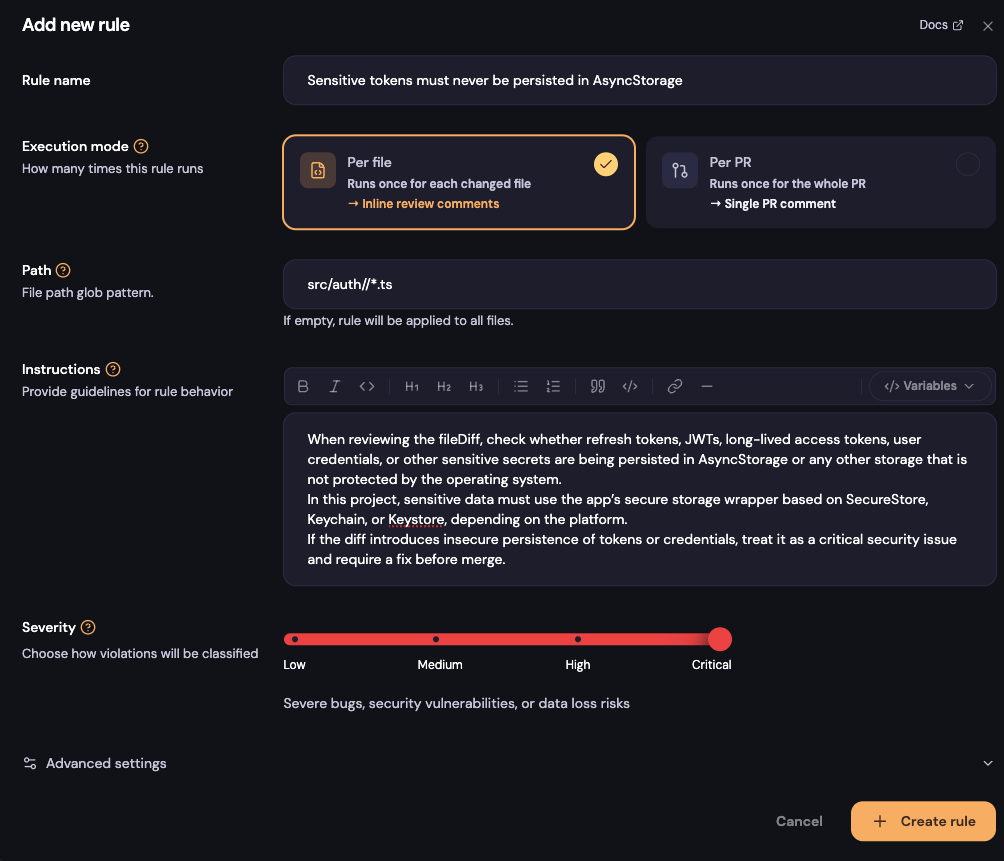
If the team does not want to start with rules versioned in Markdown inside the repository, it is also possible to create Kody Rules directly in the Kodus app. The rule is created through the web interface, inside the repository’s code review settings. There, the team chooses the rule type, defines the paths where it applies, adjusts the severity, and writes the instructions Kody should follow during review.
This option works well when the team wants to test rules quickly, change the wording often, or centralize control without opening a PR in the app code.
- File-Level: for rules that analyze a specific file or diff.
- Pull-request: for rules that analyze the context of the entire PR, such as
pr_files_diff, the scope of the change, and aggregated risk.
Frequently asked questions
What is the best AI tool for React Native?
If the team needs review with repository context, rules by app area, and control over configuration, Kodus makes more sense. If the priority is putting automatic review into the PR flow with little initial setup, CodeRabbit and GitHub Copilot get there faster. Snyk Code usually works better as an AppSec complement, not as the main PR reviewer.
Does Kodus work with Expo?
Yes. Kodus works on top of diffs, rules, and repository context. In an Expo app, it can include files such as app.json, eas.json, configuration plugins, and any generated native changes when they exist.
How do you deal with Hermes, New Architecture, and Reanimated in review?
In Kodus, this kind of change works better when the team teaches the review what needs to be checked in animation, gestures, and native code. A PR that touches the bridge, animated layout, or library integration needs version compatibility checks, correct worklet usage, correct runOnJS usage, and validation in Android release builds. This kind of regression slips through the simulator easily. Kodus helps when those checks stop depending only on the reviewer’s memory and start becoming rules, memories, and repository context.
Are there free tools for React Native code review?
Yes. Kodus, CodeRabbit, Qodo, GitHub Copilot, and Snyk have some kind of free entry point or trial. That helps with experimentation, but mobile apps still depend on well-written rules and human review.
Which self-hosted options exist for React Native reviews?
Kodus offers cloud and self-hosted. CodeRabbit offers self-hosted in Enterprise. Qodo works with enterprise options. GitHub Copilot and Snyk follow more cloud-centered models for this type of workflow.