7 Best Cursor Bugbot Alternatives (2026)
 Edvaldo Freitas

Looking for Cursor Bugbot alternatives? Bugbot is a solid AI code reviewer for teams already working in Cursor, but it may not fit every workflow, platform, or governance requirement.
This guide compares the seven best Cursor Bugbot alternatives for AI code review, so you can see where each one fits and choose the right one for your engineering team.
Last updated: October 8, 2026
TL;DR
- Cursor Bugbot is convenient for teams already using Cursor on GitHub, but it only reviews GitHub, bills per run with no published fixed rate, and its rule granularity (repo, team, and
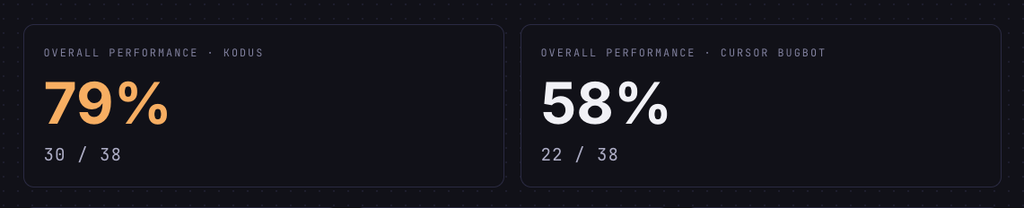
BUGBOT.md) is thinner than what dedicated governance tools offer. - In a head-to-head benchmark across 38 real bugs from five open source projects, Kodus caught 79% against Bugbot’s 58%, with the gap widest on high-severity bugs (81% versus 50%).
- Seven alternatives cover different gaps: Kodus for repository context, custom rules, BYOK, and self-hosting; CodeRabbit and Greptile for broader workflow or codebase context; Cubic and Graphite for GitHub-centric teams; Codacy and Snyk Code for quality governance or security specifically.
Cursor Bugbot alternatives comparison table
| Tool | Where it works best | How it handles team rules | When to choose it |
|---|---|---|---|
| Kodus | PR review with internal standards, repository context, BYOK, and a self-hosted option. | Natural language rules versioned in the repository, with scope by folder, file, or PR type. | When the problem is better review control and custom rules. |
| CodeRabbit | Teams that want a ready-made AI review experience in PRs, IDE, and CLI. | Uses a .coderabbit.yaml file, path-specific instructions, and guidelines. |
When the team wants fast adoption and a plug-and-play tool. |
| Greptile | Codebases where the main problem is understanding impact across files and modules. | Allows custom rules and learns from team feedback over time during reviews. | When human reviewers lose context because the codebase is spread out. |
| Cubic | GitHub-first teams that want more objective comments. | Uses custom agents, custom context, team memory, and cubic.yaml. |
When the team uses GitHub and wants to test a reviewer focused on relevant findings. |
| Graphite | PR workflow on GitHub: stacked PRs, merge queue, and sequential review. | Has custom rules, exclusions, PR filters, and comment metrics. | When the main pain is the review and merge process itself. |
| Codacy | Quality governance, security, coverage, and static analysis across several repositories. | Combines standards, gate policies, static analysis, and review.md instructions. |
When the company wants to standardize quality across many teams. |
| Snyk Code | Code security in the development workflow. | Works with policies, severity, data flow, ignores, and SAST findings. | When the main motivation is finding vulnerabilities early. |
What is Cursor Bugbot?
Cursor Bugbot is Cursor’s AI code review tool. It analyzes pull requests, identifies possible bugs, and leaves comments directly in the PR. When it finds an issue, Bugbot also connects the comment to Cursor, making it easier to fix inside the editor or the web agent.
In practice, it works best for teams that already use Cursor day to day and want an initial automated review before human review. It is a natural choice for small or mid-sized teams that are on GitHub, use Cursor as their main IDE, and want to get started quickly.
Cursor Bugbot: pros and cons
The main argument in favor of Cursor BugBot is convenience: for teams already using Cursor day to day, it fits in as a natural extension of the workflow, catching obvious issues without a major change to the review process. It starts to lose strength when the team needs more control, especially outside a GitHub and Cursor-centered workflow.
| Pros | Cons |
|---|---|
| Native to the Cursor workflow, with a “Fix in Cursor” link on each finding | Only reviews GitHub repositories; GitLab, Bitbucket, and Azure DevOps need a different reviewer |
| Low setup effort; no need for elaborate rules or policies to get value | Usage-based billing by run, with no fixed rate published by Cursor |
| Catches bugs, security issues, and diff inconsistencies as a first automated pass | Rule granularity (repository, team-wide Automations, @cursor remember, BUGBOT.md) is still thinner than dedicated governance tools |
| Already helps with general engineering standards out of the box | Can’t enforce folder-, file-, or PR-scoped policies like “no direct database access from controllers” or “extra validation on public endpoints” |
In practice, BugBot is a good option when the team wants a simple automated review layer inside the GitHub + Cursor workflow. But when the company needs broader platform support, more specific rules, repository-level control, visibility into pending issues, and more operational predictability, it is worth comparing it with tools more focused on code review governance.
The best Cursor Bugbot alternatives
1. Kodus

Kodus is an open source AI code review tool for teams that want to review pull requests with more context and less noise. It works directly in the PR and MR workflow, with support for GitHub, GitLab, Bitbucket, and Azure DevOps.
Compared with Cursor Bugbot, the main difference is the level of control. Bugbot makes sense for teams already in the Cursor ecosystem that want a simpler automated review. Kodus takes a different path: it is built for teams that want to adapt review to the real standards of their own codebase, workflow, and engineering rules.
Best for: teams that want AI code review with repository context, custom internal rules, BYOK, self-hosting, and more control over cost, model, and infrastructure.
| Pros | Cons |
|---|---|
| Review rules as engineering policy: Kody Rules guide reviews with team-specific standards, covering architecture, security, tests, performance, product domain, and internal conventions. | Not in the IDE yet; the review happens at the pull request, not while code is being written |
| Context-based scope: teams with monorepos can apply rules by folder, so a billing folder can carry different requirements than a front-end one, instead of treating the whole repository the same way. | Less integrated into the individual developer’s moment-to-moment workflow than an IDE-native tool |
| BYOK and model choice: use your own AI provider key, with more control over cost, model, latency, and data policy, and less dependence on the vendor for inference. | |
| Self-hosting and open source: companies with privacy, compliance, or data residency requirements can run the review pipeline inside their own infrastructure. | |
| External context through MCP: brings context from tickets, specs, documentation, or internal systems into the review, useful for validating business logic, not just isolated code. | |
| SOC 2 Type II: an important requirement for larger companies validating security, availability, confidentiality, and privacy controls before granting access to source code. |
We ran a benchmark comparing Kodus with Bugbot across five open source projects: Sentry, Cal.com, Grafana, Discourse, and Keycloak. Both tools reviewed the same pull requests, covering 38 real bugs. In one Sentry pull request, for instance, Kodus flagged a stale config variable being used instead of the updated one; Bugbot’s review missed it. See the full comparison, including the bug-by-bug breakdown.
| Severity | Kodus | Cursor Bugbot |
|---|---|---|
| Critical (13 PRs) | 69% (9/13) | 62% (8/13) |
| High (16 PRs) | 81% (13/16) | 50% (8/16) |
| Medium (9 PRs) | 89% (8/9) | 67% (6/9) |
Cursor BugBot still has an advantage for teams that already use Cursor and want an experience closer to the moment when code is being written, with less context switching inside the Cursor ecosystem. Kodus acts at another point in the process, the pull request, which makes more sense when the team wants to standardize review in the repository and keep it part of the team’s collective workflow rather than an extension of the IDE.
Plans and pricing
Kodus has a free Community plan, a Teams plan starting at $10 per developer per month plus the direct cost of the chosen model through BYOK, and an Enterprise plan with custom terms.
Verdict
Kodus is the best Cursor Bugbot alternative when the goal is not just having an AI commenting on PRs, but improving the team’s review standard. It makes more sense for teams that want to turn internal knowledge into clear rules, reduce generic comments, and have more control over model, cost, and infrastructure.
2. CodeRabbit
CodeRabbit is an interesting alternative to Cursor BugBot for teams that want AI review without being locked into the Cursor ecosystem.
It works mainly in pull requests, with line-by-line comments, PR summaries, fix suggestions, and interaction through comments. But an important point in the comparison with BugBot is that CodeRabbit also has an IDE experience. The tool offers an extension for VS Code and compatible editors, allowing teams to review local changes before even opening a PR.
This puts CodeRabbit in a similar position to BugBot in one important way: it also tries to bring review closer to the moment when code is being written. The difference is that BugBot does this more naturally for teams already using Cursor, while CodeRabbit tries to work better in a broader workflow, covering PRs, IDE, and different Git providers.
Best for: small teams that want a BugBot alternative with broader workflow coverage, including PR review, IDE review, and support for different Git providers.
| Pros | Cons |
|---|---|
| Can talk with developers inside the PR, useful to ask for an explanation, request a change, or understand why a comment was made | Allows customization, but does not have the same proposal of turning internal policies into a versioned review layer |
| Reviews new commits inside the same PR, so the team does not need to restart the process every time a change is pushed | For complex architecture or domain rules, it is worth testing with real PRs before deciding |
| Broad workflow coverage: summaries, incremental review, fix suggestions, and features aimed at documentation and tests |
Plans and pricing
CodeRabbit has a free plan for public repositories, an Essentials plan starting at $24 per developer per month with annual billing (formerly called Pro), a Team plan starting at $48 per developer per month with annual billing (formerly called Pro+), an Advanced plan starting at $72 per developer per month with annual billing, and an Enterprise plan with custom pricing.
Verdict
CodeRabbit is a good choice for teams that want an AI reviewer ready to use. It is especially useful when the goal is to speed up reviews without investing too much time in infrastructure or review policy. If governance is the priority instead, comparing CodeRabbit alternatives can make the decision clearer.
3. Greptile
Greptile is an alternative to Cursor BugBot for teams that want to review pull requests with more codebase context, not only based on the PR diff.
The idea behind the tool is to understand how the repository is organized, which files are related, and where a change may have an impact. This can help in PRs where the problem is not only in the changed line, but in how that change interacts with the rest of the system.
Compared with BugBot, the difference is focus. BugBot makes more sense for teams already using Cursor that want a review closer to the IDE. Greptile looks more at the PR and the repository as a whole, with automatic comments, suggestions, and codebase context to try to improve the analysis.
Best for: teams using GitHub or GitLab that want an AI review layer more focused on repository context.
| Pros | Cons |
|---|---|
| Useful in larger codebases, pointing out context-dependent issues such as changes that affect existing flows, related functions, or patterns used elsewhere in the code | Does not have the same native-product feel for teams already working inside Cursor; the center of the experience is the PR and the repository, not the IDE |
| Adapts to the team over time: uses developer feedback to adjust the type of comments it makes, reducing unhelpful suggestions | Value depends a lot on configuration, context, and continuous use; teams that do not interact with comments or adjust rules will have a worse experience |
| Works well with agent-based fix workflows: review comments can become the starting point for a fix in Cursor, Claude Code, or Codex | Makes more sense for GitHub and GitLab; validate fit first for Bitbucket, Azure DevOps, or more specific workflows |
Plans and pricing
Greptile has a Pro plan starting at $30 per seat per month, with 50 credits included and additional billing per extra credit. The Enterprise plan has custom pricing.
Verdict
Greptile can be a good BugBot alternative for teams that want to look at the PR with more codebase context, especially on GitHub or GitLab. It makes less sense when the priority is a more native experience inside Cursor or when the team needs to support other Git providers. See our guide to Greptile alternatives for more options.
4. Cubic

Cubic is an AI code review tool focused on more concise comments and bug analysis in pull requests. Its proposal is to reduce the common noise in automated reviews and prioritize issues that can truly affect the code.
Compared with Cursor BugBot, Cubic makes more sense for teams that want a tool more centered on the pull request and repository history. It can also support the flow before the PR, but its main value is reviewing changes, finding bugs, and commenting more objectively.
Best for: GitHub-first teams that want an AI reviewer focused on smaller comments, real bugs, and learning from the team’s history.
| Pros | Cons |
|---|---|
| Prioritizes higher-impact findings and avoids purely cosmetic suggestions, instead of commenting on everything | More GitHub-centered, which can limit fit in organizations that use GitLab, Bitbucket, or Azure DevOps as their main platform |
| Works with codebase context, custom agents, and fix workflows, turning some comments into faster actions | Learning from history depends on the quality of previous reviews; inconsistent or subjective past comments can carry into future ones |
| Plans work with limits on lines reviewed per developer, worth checking for teams with many PRs, large PRs, or many re-reviews |
Plans and pricing
Cubic has a Team plan starting at $40 per developer per month, a Pro plan starting at $99 per developer per month, and a Max plan starting at $200 per developer per month, all billed monthly with a 20% discount on yearly billing.
Verdict
Cubic can be an interesting alternative for teams using GitHub that want a review-focused product, with more direct comments and less of a generic assistant feel.
I would put it on the shortlist when the goal is to test a more objective AI review layer, especially in GitHub-centered workflows. Before deciding, it is worth validating how it behaves on real team PRs, especially in large repositories, PRs with a lot of context, and workflows with a high volume of changes. For a closer look at the tool and its own alternatives, see our guide to Cubic alternatives.
5. Graphite

Graphite is a code review platform mainly focused on organizing the pull request workflow on GitHub. It should not be analyzed only as an “AI reviewer,” because the proposal is broader: helping teams break large changes into smaller PRs, review those changes in sequence, and merge with fewer conflicts.
This becomes clearer in the product’s core features, such as stacked PRs, merge queue, PR inbox, and CLI. The AI part appears as a support layer inside this workflow, with automated reviews, fix suggestions, and codebase context to find bugs, edge cases, and possible performance issues.
Compared with Cursor BugBot, Graphite makes more sense when the team’s pain is not just reviewing code with AI, but better organizing the whole PR path: from creating the change to merging it.
Best for: GitHub teams that use or want to adopt stacked pull requests.
| Pros | Cons |
|---|---|
| Very good when the team works with several small chained changes: organizes stacks, avoids merge confusion, keeps the review flow moving | Not the best option for teams using GitLab, Bitbucket, or Azure DevOps as their main platform |
| Keeps the main branch more stable and reduces merge problems in teams with a high volume of pull requests | Helps a lot with the process around the PR, but is not necessarily the best choice for enforcing complex internal architecture, security, or domain rules |
| Organizes the PRs that need the developer’s attention, useful with many repositories, open reviews, or scattered notifications | |
| Allows rules, exclusions, and PR filters to control where the AI should comment and where to avoid noise |
Plans and pricing
Graphite has a free Hobby plan, a Starter plan starting at $20 per user per month with annual billing, a Team plan starting at $40 per user per month with annual billing, and a custom Enterprise plan.
Verdict
Graphite is a good alternative when the team’s pain is PR workflow, not only automated review. If review is slow because the merge process is confusing, it is worth testing. If the problem is enforcing internal standards with precision, Kodus, Greptile, or Cubic tend to make more sense, or see our guide to Graphite alternatives.
6. Codacy
Codacy is an alternative to Cursor BugBot for teams that want to combine AI code review with a more traditional code quality and security layer.
Best for: teams that want to combine AI code review with static analysis, security, test coverage, and quality gates on GitHub, GitLab, or Bitbucket.
| Pros | Cons |
|---|---|
| Useful to standardize quality across many teams: static analysis, security, coverage, and policies in a single platform | Can feel more like a traditional quality platform with AI added than a tool built first for conversational review |
| The AI Reviewer uses PR metadata, code context, Jira information, and Codacy’s own findings, connecting the analysis to the engineering workflow | The center of the tool is still static analysis, code quality, security, and PR feedback combined; for very specific internal rules, test with real PRs first |
| Supports custom instructions by file in the repository, adapting the review to the team’s standard |
Plans and pricing
Codacy has a free Developer plan, a Team plan starting at $18 per developer per month with annual billing or $21 per developer per month with monthly billing, and a Business plan with custom pricing.
Verdict
Codacy is a good choice when the goal is quality and security governance. For teams focused strictly on PR review with less noise and more refined internal rules, I would evaluate Kodus, Greptile, or Cubic first, or see our guide to Codacy alternatives.
7. Snyk Code
Snyk Code is Snyk’s SAST tool, built to find vulnerabilities in proprietary code before they reach production. It uses the DeepCode AI engine to analyze data flow, unsafe API use, null dereference, race conditions, hardcoded secrets, and other security-related issues.
Compared with Cursor Bugbot, Snyk Code solves a narrower problem. It does not try to be a general reviewer for architecture, readability, or the team’s internal standards. The proposal is to protect the development flow by bringing findings into the IDE, CLI, CI/CD, and pull requests.
In PRs, Snyk can publish a summary of findings, inline comments (limited to 10 per pull request), and, in some cases, fix suggestions with Snyk Agent Fix.
Best for: teams looking for a Cursor Bugbot alternative because they want to strengthen security in the PR workflow, especially in companies that already use Snyk for dependencies, containers, IaC, or AppSec.
| Pros | Cons |
|---|---|
| Focused on SAST and security analysis: identifies unsafe patterns, dangerous data flows, and issues that can become production vulnerabilities | Not built to review architecture, domain rules, internal standards, or general PR quality; it is a security layer |
| Usable in the IDE, CLI, CI/CD, repository, and pull request, finding problems before the PR and blocking new changes when needed | Configuration logic is centered on policies and security findings, not natural rules like “in this folder, services cannot access the database directly” |
| The PR experience generates a summary of findings and inline comments with severity, description, and, when available, data flow | Limit of 10 inline comments per PR; no Data Flow in inline comments for GitLab and Azure Repos |
Plans and pricing
Snyk has a free plan, a Team plan starting at $25 per month (flat, for up to 10 developers), and an Enterprise plan with custom, credit-based pricing.
Verdict
Snyk Code is a good Cursor Bugbot alternative when the main motivation is security. It helps find vulnerabilities early, bring findings into the PR, and connect that to the company’s AppSec program.
I would not put Snyk Code as the first choice for a team that wants to broadly improve PR review, with internal architecture rules, product context, and fine control over AI behavior. In that case, it works better as a complement. Use Snyk Code for security and a more specialized AI code review tool for internal standards, business logic, and general pull request quality. For teams weighing other security-focused options, see our guide to Snyk alternatives.
Why Kodus is the best Cursor Bugbot alternative for AI code review
AI code review usually falls short for a simpler reason: review behavior doesn’t match how the team actually works.
Many tools can comment on a PR. Few can enforce specific engineering standards without becoming a source of noise. Kodus stands out because it treats review as a team policy, with explicit rules, repository context, and control over model and infrastructure.
In practice, this shows up in four areas.
- Repository context: the analysis considers more than the changed lines, which helps catch contract violations, internal standards, and indirect effects.
- Natural language rules: the team can write review standards in clear text, without depending only on technical configuration.
- Model control with BYOK: the company chooses the AI provider, tracks direct cost, and can switch models without changing the review platform.
- Self-hosting and open source: the tool can run in environments with privacy, audit, and data residency requirements.
As more code is generated by AI, automated review needs to become more selective. A bot that comments on everything only transfers work to the human reviewer. Kodus is more interesting because it lets teams shape review behavior around what they actually want to block, reinforce, or standardize.
Frequently asked questions
For teams focused on AI code review for pull requests, the best alternative is Kodus. It combines repository context, custom rules, BYOK, self-hosting, and more control over review behavior.
Yes. Kodus is a good alternative mainly when the team wants more than automatic comments. It helps enforce internal standards, reduce noise, and control how AI reviews code.
Cursor Bugbot is more connected to the Cursor ecosystem and works well as a first automated review in PRs. Kodus is more focused on review governance, custom rules, and broader repository context.
Cursor Bugbot reviews pull requests on GitHub, including GitHub Enterprise Server. It does not work on GitLab, Bitbucket, or Azure DevOps, so those platforms need a different reviewer.
Cursor moved Bugbot to usage-based billing, charged per run. Cursor does not publish a fixed per-run rate, so the real cost depends on your plan’s included usage and the size and complexity of each pull request.
Yes. Kodus is an open-source (AGPLv3) alternative that reviews pull requests on GitHub, GitLab, Bitbucket, and Azure DevOps, with self-hosting and BYOK.